

Your Latest Campaign Is Live. Half Your Locations Are Using the Old Assets.
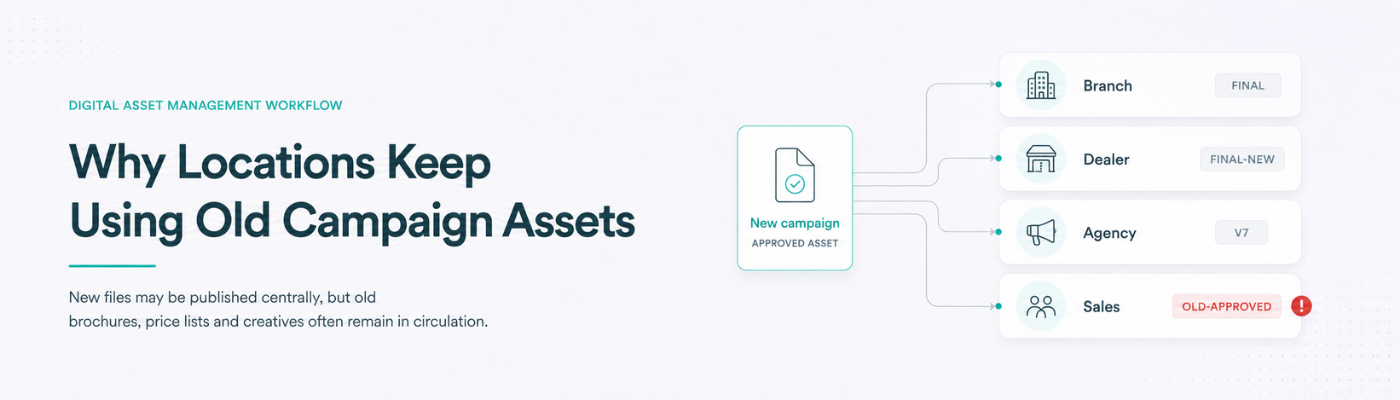
Head office approves a new campaign on Monday. The revised brochure, price sheet, social creatives and sales deck are uploaded to the shared drive. An email asks every branch, dealer, agency and sales team to use the latest files.
Three weeks later, a customer receives the old price list.
Another branch publishes the previous offer. A dealer edits last quarter’s creative because it is already saved on their laptop. A salesperson presents an outdated product claim from an older deck.
The central marketing team published the new assets. It did not remove the old ones from circulation.
That is the difference between storing files and controlling them. Solving the problem requires more than a cleaner folder. It requires a functioning digital asset management workflow.
Publishing a New File Does Not Remove the Old One
Most organizations distribute new campaign material through shared drives, emails, portal uploads or messaging groups. They assume people will stop using the previous version.
Usually, they do not.
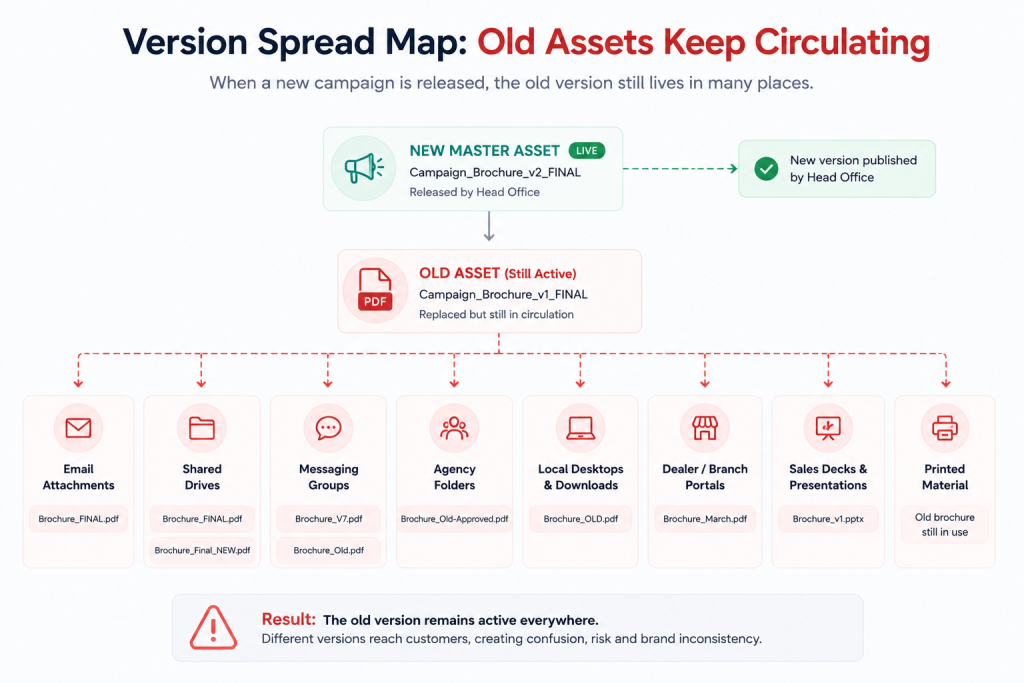
Old files remain in:
- Email attachments
- Shared folders
- WhatsApp and Teams groups
- Agency systems
- Local desktops
- Dealer portals
- Sales presentations
- Download folders
- Printed brochures and posters
Once an asset has been downloaded, copied or forwarded, the central team loses control over it. The new version may exist, but the old one is often easier to find and more familiar to the user.
This is why document version control cannot depend on filenames such as Final, Latest, Approved or Final_v8. A filename suggests which version should be used. It does not prevent someone from using the wrong one.
The Problem Is Not Storage
When asset confusion increases, businesses often reorganize their folders. They add more categories, rename files and create a “Latest Approved” directory.
That may help people search, but it does not answer the important questions:
- Who owns the asset?
- Who approved it?
- When did it become valid?
- When does it expire?
- Which asset did it replace?
- Which locations may use it?
- What local changes are allowed?
- Who downloaded it?
- Where is it currently published?
- Can the old version be withdrawn?
- Can the company prove which version was active on a particular date?
These are workflow and governance questions.
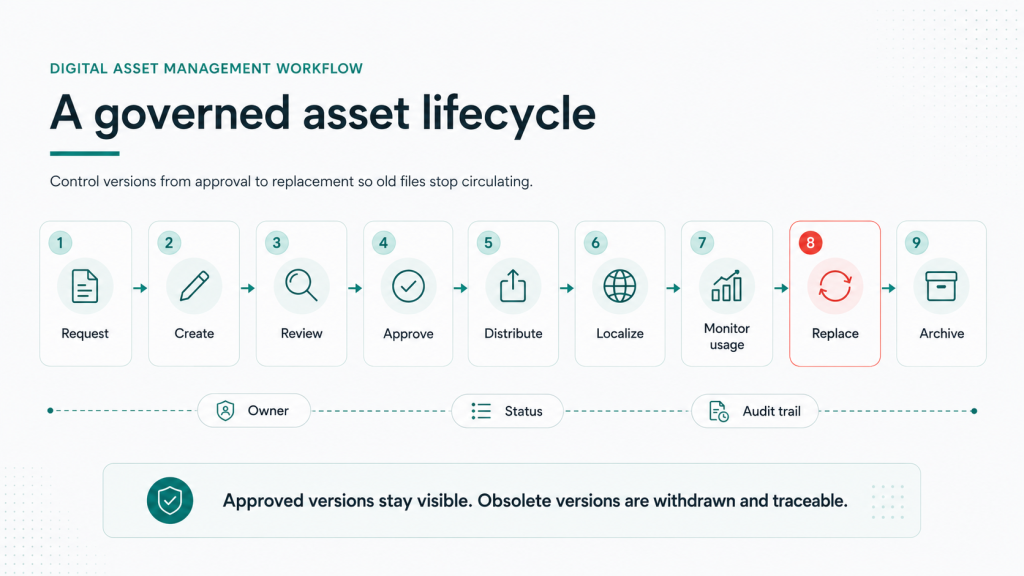
A reliable digital asset management workflow controls an asset from creation and approval through distribution, adaptation, replacement and archive. The asset is treated as a governed business object, not simply a file in storage.
Where Old Assets Stay Active
Shared drives
Shared drives often contain every version ever created. The current brochure sits beside several older copies because nobody wants to delete a file that may still be needed.
Users are expected to identify the correct version from the filename and modification date. That is not dependable document version control.
Email and messaging groups
An attachment becomes a separate copy the moment it is sent. Updating the original does not update the file inside hundreds of inboxes.
Messaging groups make the problem worse. Files are forwarded without approval history, expiry dates or replacement notices. The most recently shared file may not be the most recently approved one.
Agency and partner systems
External agencies, dealers and partners usually maintain their own folders. When the central team replaces an asset, it may not know which copies remain in those external systems.
Months later, an agency may reuse an old campaign master because it already has the correct format and dimensions.
Local desktops and sales decks
Employees save regularly used files locally because it is faster than searching every time. Those files remain available long after the central version changes.
An old brochure can also stay embedded inside a sales presentation even when the original source file has been replaced.
Printed material
Replacing a digital file does not remove printed copies. A branch may continue distributing an outdated brochure because several hundred copies are still available.
A proper replacement process must cover both digital and physical assets.
The Business Cost of One Wrong Version
Using an outdated file may look like a small execution error. The consequences can be much larger.
Incorrect price or offer
A customer sees a price, discount, package or promotional condition that is no longer available. The business must honour the old offer, disappoint the customer or explain why its own material was incorrect.
Outdated product information
An old brochure may include discontinued features, unavailable services or incorrect specifications. The sales team must then correct expectations after the customer has already made a decision.
Missing compliance language
A revised asset may contain an updated disclaimer, eligibility condition or required disclosure. Continued use of the old version creates risk even if the campaign message itself has not changed.
Inconsistent customer experience
The website shows one offer, the branch communicates another and the salesperson shares a third.
The customer does not see a file-management problem. They see a business that cannot agree with itself.
Rework and audit gaps
Each mistake creates investigation, correction, redistribution and follow-up. If compliance asks which version was active at a particular location on a particular date, the organization may have no reliable answer.
Strong campaign asset governance should make that answer available without reconstructing emails and folders.
Why Distributed Businesses Struggle More
The problem is more visible in companies operating through branches, stores, clinics, campuses, dealerships, franchisees or regional agencies.
The central team wants consistency. Local teams need speed.
A branch may need to add a local phone number, regional language, event date or location CTA. If every adaptation must return to head office, execution becomes slow. If every location can edit anything, control disappears.
That is the central challenge of multi-location marketing.
The answer is to define which fields are fixed and which may be edited locally.
Local teams might be allowed to change:
- Branch address
- Phone number
- Approved local language
- Event date
- Location image
- Local CTA
They should not be able to change:
- Core campaign message
- Product claims
- Mandatory disclosures
- National pricing
- Brand identity
- Offer eligibility
A practical brand asset management model makes these boundaries visible and enforceable.
Why “Please Use the Latest Version” Fails
Most asset-control processes depend on reminders:
- Delete the previous file.
- Use only the attached version.
- Stop using the old creative after Friday.
- Confirm once every branch has updated it.
These instructions depend on every recipient seeing the message, understanding it and acting correctly. Some people miss the email. Some are on leave. Some update the digital file but forget the sales deck. Others do not know every place where the old asset is being used.
A dependable digital asset management workflow should not require perfect memory across the organization. It should make the current version easy to find and the obsolete version difficult or impossible to use.
What a Controlled Asset Lifecycle Requires
Every important asset should include:
- A named owner: Someone must be accountable for accuracy, review and replacement.
- Approval status: Users should see whether the asset is draft, approved, published, expired or withdrawn.
- Effective and expiry dates: Time-sensitive assets should stop appearing in normal search when they are no longer valid.
- A replacement link: Anyone opening an old version should be directed to the current one.
- Role-based access: Creators, reviewers, local users and administrators should have different permissions.
- Controlled local adaptation: Approved fields can be edited while brand, legal and product elements remain locked.
- Distribution records: The business should know which locations, agencies or partners received the asset.
- Usage visibility: Teams should see which assets are downloaded, adapted or ignored.
- Automatic withdrawal: Replaced files should no longer remain available as normal working material.
- An audit trail: The system should record creation, approval, publication, replacement and expiry.
This is the difference between basic storage and mature marketing asset management.
What the Approval Process Should Look Like
A practical content approval workflow should begin with a clear request containing the campaign, asset type, audience, owner, launch date and expiry date.
The asset should then move only through the reviews relevant to its risk. Brand checks visual consistency. Product confirms factual accuracy. Legal reviews regulated claims. The business owner confirms commercial details.
Once approved, the asset receives a visible status, effective date, permitted-use rules and target audience. Draft and rejected versions remain unavailable to general users.
When the campaign changes, the revised asset moves through the required reviews and formally replaces the previous version. Users are notified, while the old file is removed from normal access.
Measure Version Confusion
Track more than the number of files uploaded. Useful measures include:
- Time required to find the correct asset
- Number of duplicate copies
- Downloads of expired assets
- Approval turnaround time
- Time required for local adaptation
- Number of unofficial assets
- Correction and withdrawal rate
- Adoption rate for the new version
If users regularly ask group chats for the latest deck, marketing asset management is not working. If locations continue publishing expired files, campaign asset governance is weak. If approvals take too long, teams will bypass the official content approval workflow.
Run This Audit
Choose one brochure, price sheet, sales deck or campaign creative replaced during the last three months.
Check:
- How many copies of the old file still exist?
- Can users still download it?
- Is it stored in old email threads or messaging groups?
- Do agencies and partners retain copies?
- Is it included in current sales presentations?
- Are printed versions still being distributed?
- Does the old file point users to the replacement?
- Can employees find the current version without asking someone?
- Who owns and approved it?
- When does it expire?
- Can you identify where it is currently being used?
This will show whether the company has shared storage or actual document version control.
Where Does Your Growth Stop?
Growth may stop when a customer sees an expired price, when a dealer presents an outdated feature or when a salesperson spends twenty minutes searching for the correct deck.
The campaign itself may be strong. The execution is fragmented.
WeAddo’s Operations Suite is designed for this operational seam. It brings together asset centralisation, document governance, workflow automation and integration so teams stop hunting, rebuilding, chasing and manually reconciling files.
The question is not whether head office published the new campaign.
The question is whether the old campaign actually stopped.
Conclusion
A new asset does not become the official version simply because it was uploaded last.
A reliable digital asset management workflow controls ownership, approval, access, distribution, local adaptation, expiry and replacement. Effective brand asset management protects the core brand while allowing approved local changes. Strong multi-location marketing gives distributed teams speed without creating uncontrolled versions. Clear campaign asset governance makes it possible to prove which file was active, where it was used and when it was replaced.
Search for one recently replaced asset and count how many usable copies of the old version still exist.
That is where the operational leak begins.
Audit one recently replaced campaign asset. Find every old copy and calculate how long it would take to withdraw it completely.
A digital asset management workflow is the process used to create, review, approve, distribute, update, expire and archive digital assets while preserving ownership, permissions and version history.
Shared storage keeps files in folders. Marketing asset management adds approval status, expiry dates, permissions, replacement links, usage records and controlled distribution.
Old files remain available in emails, shared drives, messaging groups and local devices. Weak document version control makes it difficult to identify or enforce the approved version.
A multi-location marketing system can provide approved templates with locked brand and compliance fields while allowing local teams to edit permitted details.
A content approval workflow should include a named owner, required reviewers, visible status, version history, effective date, expiry date and proof of final approval.







Leave a Reply