The Customer Has Already Bought. Your Campaign Is Still Asking Them to Buy.
by
vikas weaddo
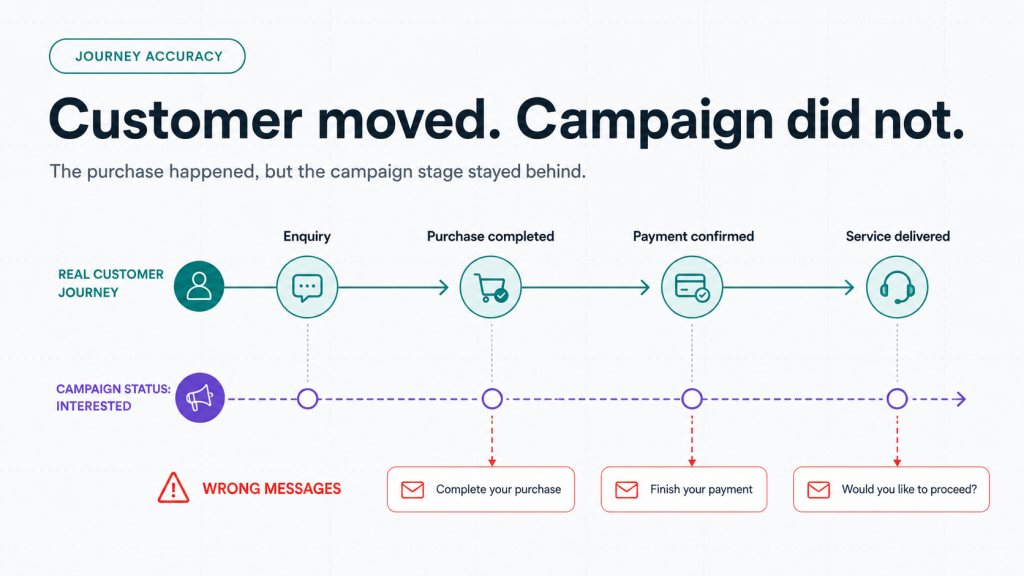
A customer completes a purchase on Monday. On Tuesday, they receive an abandoned-cart reminder. On Wednesday, a salesperson calls to ask whether they would like to proceed.
The customer has already proceeded. Your communication has not.
This happens when purchase, booking, payment or service events remain inside operational systems while marketing continues working from an older CRM stage. The messages may be scheduled correctly, but the campaign is still wrong because the customer has moved forward and the system has not noticed.
A customer journey orchestration platform should prevent this gap by using current business events to decide what communication and action should happen next.
Automation Is Only as Current as Its Last Status Update
Marketing automation often works from labels such as New Lead, Interested, Cart Abandoned, Application Pending or Payment Due. These labels are useful only when they change at the right time.
A customer may complete payment in the commerce system, confirm an appointment in the booking engine or finish onboarding in a portal. If that event does not update the CRM and campaign logic, the customer remains trapped in the previous stage.
This appears across industries:
A patient confirms an appointment but continues receiving booking prompts.
A student pays an application fee but still receives completion reminders.
A retail customer purchases in store but receives an online-cart message.
A B2B prospect signs a contract but remains in a demo sequence.
The problem is not message frequency. The problem is that the communication reflects an outdated journey stage.
The Purchase Event Exists. Marketing Cannot See It.
Most organizations already record the important event somewhere. Commerce knows an order was placed. The payment gateway knows the transaction succeeded. The booking system knows the slot was confirmed. Marketing often works from a different system.
When those systems depend on delayed exports, manual updates or incomplete integrations, the customer status may take hours or days to change. In some cases, it never changes.
A CRM data synchronization platform should move the relevant event into the systems responsible for communication, service and reporting. It should not require employees to export lists, update stages manually or remember to remove customers from campaigns.
Why the Wrong Message Keeps Going Out
The CRM is treated as the only source of customer status
The CRM may know the sales stage but not the latest transaction or service outcome. When campaigns depend only on CRM labels, operational events remain invisible.
Data arrives too late
A daily file may update customers after an automated reminder has already been sent. Important journey changes often need faster updates.
Stage definitions do not match
“Converted” in marketing may mean a submitted form. In sales, it may mean a qualified opportunity. In commerce, it may mean a paid order. Without shared definitions, teams use the same word for different outcomes.
Campaign exits are poorly designed
Teams define who enters a sequence but often overlook who should leave it. A customer remains in nurture because no exit rule listens for the completed transaction.
Offline actions do not return to digital systems
A customer may purchase at a branch or complete a process through a relationship manager. If that action does not update the central profile, digital campaigns continue as if nothing happened.
One Customer Stage Should Control the Next Action
A customer lifecycle platform should recognize meaningful stage changes and coordinate the next step across channels. Useful events include:
Appointment or demo confirmed
Payment completed or failed
Product purchased or service delivered
Order cancelled or refunded
Support case opened
Renewal due
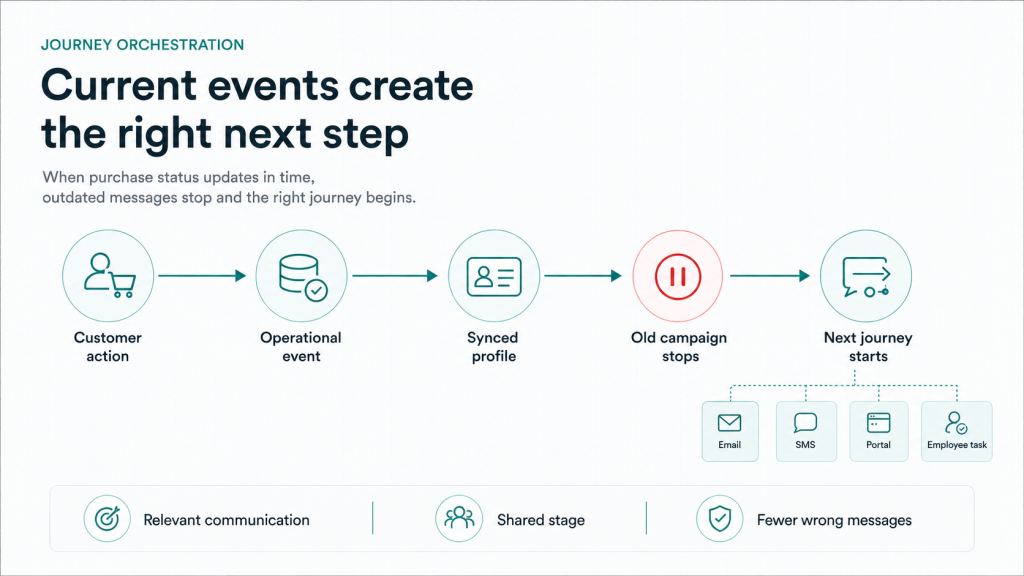
Each event should stop actions that no longer apply and start actions that now make sense. Payment completion should stop reminders, trigger confirmation, notify operations and begin the correct post-purchase journey. A cancellation should stop fulfilment messages and begin refund or recovery communication.
The system should respond to what the customer has done, not what the last campaign assumes they might do.
What a Connected Journey Should Look Like
1. Define the business event
Agree on what counts as purchase completed, booking confirmed, service delivered or application finished.
2. Identify the owning system
The system closest to the real action should confirm the event. Payment success should come from the transaction system. Fulfilment should come from operations.
3. Synchronize the customer status
A CRM data synchronization platform should carry the event, customer identifier, time and context into the CRM, customer profile and journey logic.
4. Stop outdated communication
Every sequence should have clear exit conditions. Purchase, cancellation, payment or service completion should remove the customer from messages that no longer apply.
5. Trigger the correct next step
The next action might be confirmation, onboarding, fulfilment, feedback, support or renewal preparation.
6. Preserve the journey history
Teams should be able to see which event changed the stage, which communication stopped and what followed.
Personalization Begins with Not Repeating the Wrong Ask
Personalization starts with one basic rule: do not ask customers to complete something they have already completed.
A customer journey orchestration platform should ensure that web, portal, CRM, email, SMS and employee actions reflect the latest stage. A buyer should be treated as a customer, while someone waiting for fulfilment should receive fulfilment information, not another sales push.
Measure Journey Accuracy, Not Only Campaign Performance
Track:
Customers contacted after completing the requested action
Time taken for purchase or payment events to reach the CRM
Messages sent from an outdated lifecycle stage
Manual removals from active sequences
Journeys without defined exit conditions
These measures show whether the customer lifecycle platform is coordinating the relationship or merely delivering scheduled communication.
Run This Audit on 100 Recent Customers
Choose customers who recently purchased, booked or paid. Check:
When did the business event occur?
When did the CRM stage change?
Which campaigns remained active?
Was the correct next action triggered?
Did anyone update the record manually?
The delay between the actual event and the updated status is where the wrong communication begins.
Where Does Your Growth Stop?
Growth can stop after conversion because the business keeps treating the customer like an unconverted lead. The customer bought, booked or paid, but the systems responsible for communication continued working from yesterday’s information.
WeAddo’s Experience Suite connects lifecycle automation with booking, commerce and portal journeys. The Data Suite supports connected customer profiles and decision intelligence, while integrations carry operational events into the systems responsible for the next action. Experience, operations and data must behave as one connected business system.
Conclusion
Automation becomes useful when it reacts to the customer’s current stage.
A working customer journey orchestration platform should stop outdated campaigns when a meaningful event occurs. A reliable CRM data synchronization platform should move status between systems without manual exports. A connected customer lifecycle platform should ensure that the next message and action match what the customer has actually done.
Choose one post-purchase journey and trace how long it takes for every system to recognize the customer’s new status.
That delay is where relevance is being lost.
Audit 100 recent customers and identify every message sent after they had already completed the action being requested.
A customer journey orchestration platform coordinates customer actions, business events and communication across systems so the next step reflects the customer’s current stage.


Leave a Reply