

Why One Service Page Takes Two Weeks to Launch
The business approves a new service on Monday. The campaign is ready. The sales team knows the offer. The launch date is agreed.
The website page goes live two weeks later.
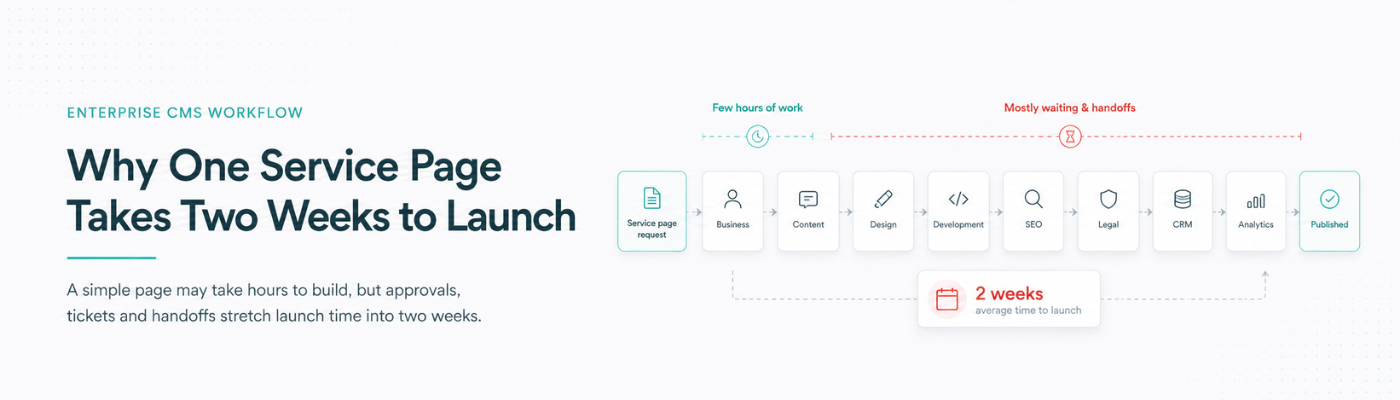
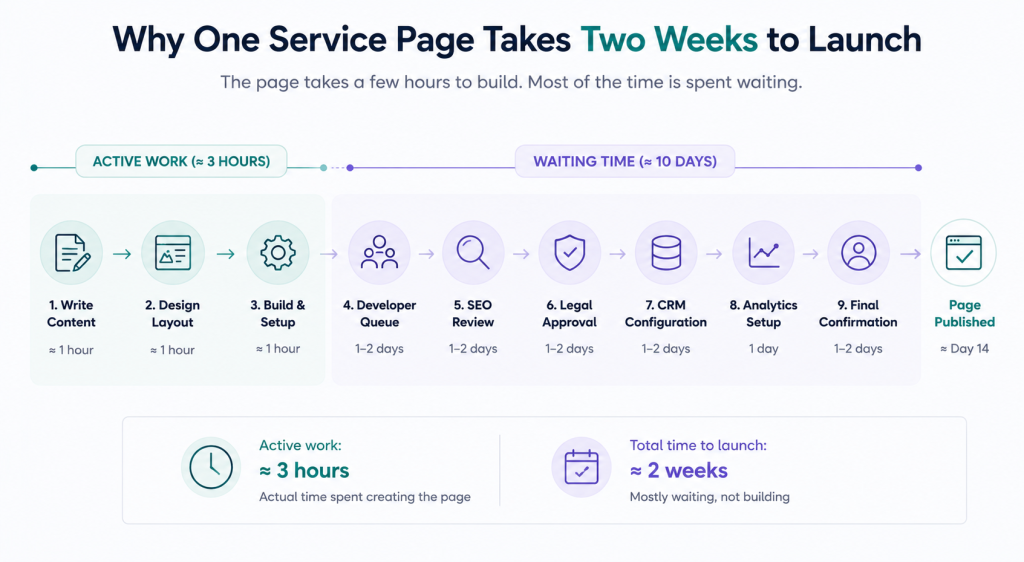
During those two weeks, the request moves through the business team, content team, agency, designer, developer, SEO specialist, legal reviewer, CRM administrator and analytics team. The actual page may take only a few hours to create. Most of the time is spent waiting for someone else.
By the time it is published, the campaign date has moved, the offer has changed or a local team has already built its own version.
The delay is usually blamed on the content team, agency or developer. The real problem is the absence of a working enterprise CMS workflow.
Count How Many People It Takes to Publish One Page
A routine service page may need input from:
- A business owner
- A content writer
- A designer
- An SEO specialist
- A developer
- A legal or compliance reviewer
- A CRM administrator
- An analytics specialist
- A final approver
None of these roles is unnecessary. The problem is that their work is often coordinated through email threads, chat messages, shared documents and separate tickets.
The content writer waits for service details. The designer waits for approved copy. The developer waits for the visual. SEO reviews the page after development. Legal approves an attachment that may no longer match the version in the CMS. CRM routing is configured after the page is otherwise ready.
The page spends three hours being created and ten days waiting.
This is why businesses should measure the complete content publishing workflow, not only how quickly individual teams finish their assigned tasks.
The Page Is Simple. The Process Around It Is Not.
Most service pages contain familiar elements: a title, description, image, benefits, price or offer, location information, CTA and form.
Yet every launch becomes a small technology project because the website was not designed around recurring business changes.
Healthcare groups regularly add specialists, services and locations. Universities add courses and campus pages. Automotive companies launch models, dealerships and service offers. Retail businesses publish categories, collections and store pages. B2B companies create solution pages, case studies and campaign landing pages.
These are normal business activities. They should not require a custom build every time.
A functioning enterprise CMS workflow should allow approved teams to create common page types using governed templates, structured information and predefined integrations.
Why Routine Pages Become Mini Projects
The CMS cannot reuse business information
Many websites store information as isolated page content. A service name, location, price or profile may be copied across several pages, forms and portals.
When the information changes, each copy must be updated separately.
This creates extra work and inconsistency. One page shows the new price while another still shows the old one. A location page lists a service that is no longer available. A booking form uses a different service name from the website.
Effective content operations store reusable information as structured content. A service, product, location or profile should be updated once and reused wherever required.
Every page needs a developer
Developers should solve technical problems. They should not be required to duplicate an approved layout, update a heading or add another branch.
When routine publishing depends on developer capacity, commercially urgent requests compete with security work, integrations and system fixes.
The page waits because it is technically minor, even when it is commercially important.
A practical content publishing workflow lets authorized teams manage standard page elements without raising a development ticket or editing code.
The CTA is configured after the page
The page may be ready, but the customer action behind it is not.
The team still needs to decide:
- Which form or booking flow should open?
- Which fields should be collected?
- Which CRM campaign should receive the enquiry?
- Which branch or team should own it?
- What should the customer see after submission?
- Which follow-up should start?
- How will the conversion be measured?
This is why many specific campaign pages still send people to a generic “Contact us” form.
Strong landing page management connects the page, CTA, form, CRM routing and measurement before publication. A launch is incomplete if the page is visible but the next action is broken.
SEO is added at the end
SEO often becomes a final checklist. Someone requests a meta title, discovers the URL is incorrect or notices that the heading structure and internal links are missing.
Another review cycle begins.
A better enterprise CMS workflow includes SEO fields, URL rules, schema options, internal-link guidance and page templates from the start. SEO should be part of the page structure, not a correction made after development.
Approval happens across email and chat
A draft is circulated as a document. Comments arrive through email. Another stakeholder sends changes through chat. Someone edits the CMS directly. Legal approves an older attachment.
No one is certain which version is final.
A reliable CMS approval workflow should show the current version, status, reviewer and approval history in one place. It should be possible to see what was approved without reconstructing an email chain.
Local Teams Create Workarounds When the Central Process Is Slow
When head office takes too long, branches, dealers, campuses and regional teams find faster options.
They create pages through another tool, copy an old landing page, use an external form or ask a local agency to build a microsite.
The immediate requirement is solved, but the business now has:
- Inconsistent messaging
- Duplicate pages
- Unapproved claims
- Incorrect offers
- Untracked forms
- Customer data entering different systems
- Pages no one remembers to update or remove
This is especially common when organizations lack a capable multi-location CMS.
Central control cannot mean that every branch change waits for head office. Local flexibility cannot mean that every location builds its own version of the website.
The system must define what local teams may change and what remains centrally controlled.
What Business Teams Should Be Able to Manage
Authorized users should be able to manage recurring business content such as:
- Service, product and category pages
- Branch, dealer and campus pages
- Expert, doctor or adviser profiles
- Campaign landing pages
- Approved content blocks
- Images and documents
- SEO titles and descriptions
- CTA selection
- Local contact details
- Publish and expiry dates
This does not mean unrestricted publishing. It means working inside approved templates and rules.
A multi-location CMS might allow a branch team to update its phone number, operating hours or approved local offer while preventing changes to the global brand design, mandatory disclosures and core product claims.
What Should Remain Governed
Certain elements should stay centrally controlled:
- Brand templates
- Page structures
- Legal and compliance statements
- User permissions
- Form standards
- CRM-routing rules
- Analytics requirements
- Accessibility rules
- SEO structure
- Version history
- Publishing and expiry policies
This is the role of website content governance.
Good governance should reduce uncertainty, not create another approval meeting. When rules are built into templates, fields and permissions, teams can move faster because the system already knows what is permitted.
What a Working Approval Process Looks Like
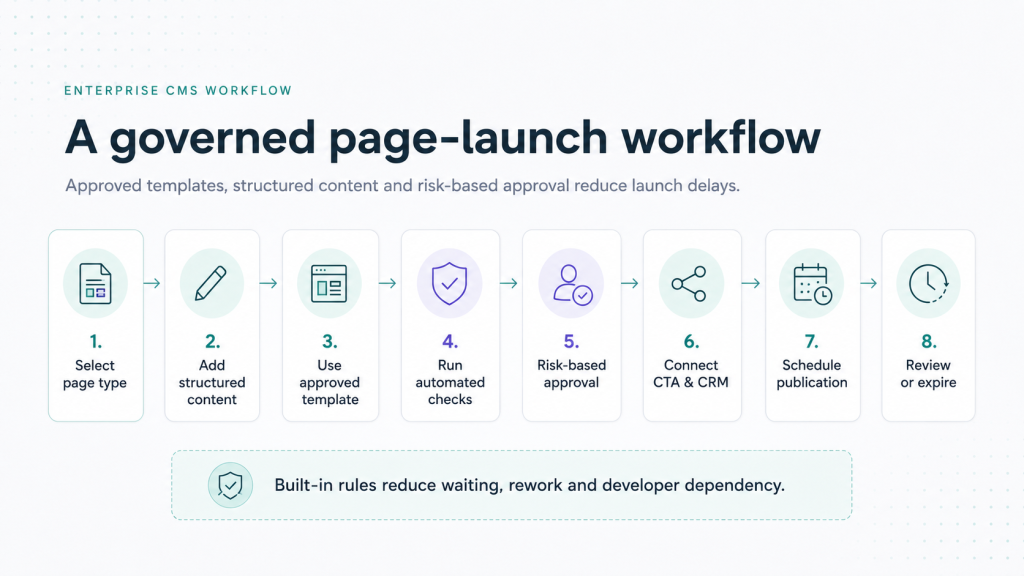
A practical CMS approval workflow could operate as follows:
- The business owner selects an approved page type.
- Required service, location, offer and CTA details are completed.
- The content team creates or updates the approved content blocks.
- Automated checks identify missing SEO, accessibility or mandatory fields.
- Legal reviews only the claims relevant to its role.
- The business owner confirms operational accuracy.
- The page is scheduled for publication.
- The system records the approved version.
- The page expires or returns for review on a defined date.
Not every page needs every reviewer. A policy page may require legal approval, while a routine profile update may require only content review.
Risk-based approval prevents low-risk changes from being delayed by a process designed for high-risk content.
Stop Rebuilding the Same Page
Most companies use a limited number of page types:
- Service page
- Product page
- Location page
- Profile page
- Course page
- Campaign landing page
- Offer page
- Resource page
Each type should have an approved template containing the expected content, SEO fields, CTA options, tracking requirements and approval rules.
Good landing page management lets a team choose an approved structure, add the campaign-specific information, connect the correct action and publish without rebuilding the complete experience.
The aim is not to remove thought. It is to stop repeating decisions the organization has already made.
Measure the Launch Process, Not Only Page Performance
Website teams usually measure traffic and conversion after launch. They should also measure how the page reached the market.
Track:
- Request-to-publish time
- Active work versus waiting time Number of handoffs
- Number of revision cycles
- Developer dependency
- Approval waiting time
- Post-publication correction rate
- Number of unofficial pages
If a page takes ten days to launch but only five hours of active work, the problem is not individual productivity. It is the content publishing workflow.
If local teams repeatedly create unofficial pages, the official process is probably too slow or too restrictive.
Run This Audit on Your Last Ten Page Launches
Review the last ten service, product, location or campaign pages your company published.
Ask:
- How many calendar days did each page take?
- How many hours of active work were involved?
- How many teams touched it?
- Was a developer required?
- Was an approved template used?
- Was SEO completed before publication?
- Was the CTA connected to the correct workflow?
- Did CRM or analytics setup delay the launch?
- Did a local team create an alternative?
- Does the page have a review or expiry date?
The pattern should become visible quickly.
Where Does Your Growth Stop?
Sometimes growth stops before the market even sees the offer.
The campaign is ready. The sales team is ready. Customer demand exists. The service page is waiting for a developer ticket, final approval or CRM configuration.
WeAddo’s Experience Suite is designed to connect the customer-facing layer across CMS, portal, booking, commerce and lifecycle automation. The goal is not a prettier website. It is a front end that can receive intent, trigger the correct action and move at business speed.
Conclusion
A routine service page should not require a small transformation project.
An effective enterprise CMS workflow gives teams approved page types, structured content, controlled permissions, clear approvals and connected CTAs. Strong content operations reduce repeated work. A risk-based CMS approval workflow protects the business without delaying every update. Better landing page management connects the page to the customer’s next step. A capable multi-location CMS gives local teams speed without creating uncontrolled versions. Clear website content governance keeps the system reliable.
Choose one recurring page type and count the tickets, emails, chats and people required to publish it.
That is where your launch speed is being lost.
Audit one recurring page type and remove the first unnecessary dependency from its publishing process.
An enterprise CMS workflow is the process used to create, review, approve, publish, update and retire website content across teams and locations.
Pages are often delayed by developer dependencies, manual approvals, late SEO reviews, separate CRM setup and fragmented content operations.
A CMS approval workflow should include clear roles, visible status, version history, risk-based approval and a record of the final approved content.
Yes. A governed content publishing workflow can allow authorized users to publish standard page types through approved templates and fields.






Leave a Reply